
Have you ever run out of printer ink at exactly the wrong moment? Then this NEWYES thermal printer review is for you. This tiny, portable A4 printer prints without any ink, connects to your phone, PC or Mac, and comes with its own carry bag. Honestly, I think it is perfect for travel documents and learning resources. And I have been putting it to the test on desktop and the app; so grab a cuppa and read on to see what I made.

Some links in this post are affiliate links, so I may earn a small commission if you buy through them, at no extra cost to you. Thank you for supporting my little crafty corner of the internet!
What You Will Find Here
What Is the NEWYES Thermal Printer and How Does It Work?
The NEWYES thermal printer is a small, portable, rechargeable A4 printer. Instead of ink or toner, it uses heat. The print head warms special thermal paper, and the paper darkens to form your words and pictures.
So there are no cartridges to buy, and nothing to dry out either. All you need is the printer and a supply of thermal paper. That makes it brilliant when you have very little space for a printer.

Why the NEWYES Thermal Printer Is Perfect for Travel Documents
Travel is where this little printer really shines for me. I am planning a California road trip, and we will be visiting places in the middle of nowhere. That means patchy Wi-Fi, so a paper backup of my booking details and reservation numbers gives me real peace of mind.
My planning pages can also be quite ink-heavy. Printing them on thermal paper means I don’t waste ink, so there is less waste. It’s handy for tickets, such as our Disney tickets, and for other travel paperwork. Everything lives on my phone as well, but a printed backup is brilliant when the signal disappears. Which I expect to happen a lot on our trip.
The printer is small enough to grab out of a cupboard, and the carry bag makes it easy to travel with. Whether you are homeschooling, worldschooling or travelling like us, it goes where you go. That means I can print documents and be ready for hotel check-ins and activities.

Making Learning Resources and Kids’ Activities With The NEWYES Thermal Printer
This is the bit I really love. Using free tools, I made three different educational printables and printed them all on the NEWYES thermal printer.
First, I made A4 alphabet tracing sheets in Canva. Next, I printed a map of England for the kids to colour. Building word tracing sheets is really easy, and you can save them and reprint them whenever you need a worksheet. You can use names or seasonal words to make themed activity sheets, so they are great for activity planning.

Printing was just as simple. I loaded a sheet, sent the file to print, and used the layout setting to flip the page so it came out the right way up. It just blows my mind that something this tiny does it without any ink.
A quick tip: felt pens work beautifully on the finished sheets. Colouring pencils, however, scratch the surface, so keep those in the pencil case.
You can make plenty more with it. Colouring pages are great for a rainy day, and you can turn any image into a colouring-ready printable. You can also print North Pole labels for presents, either on thermal sticker paper or by glueing them on.
How Easy Is the NEWYES Thermal Printer to Use?
It felt straightforward from start to finish. You connect the NEWYES printer to your phone through the app. Or connect to your PC or Mac by downloading the software and using Bluetooth or the cable. Load a sheet of thermal paper, flip the layout and print.
That is honestly about it. There are no cartridges to fit and no messy set up. As a result, it is a great gadget to hand to a busy parent, a teacher or a grandparent.

Printing on the Go With the XLife App
The printer connects to its own app, called XLife, and it really is quick and easy to set up and use. I just scanned the QR code that comes with the printer, downloaded the app, and I was ready to print within a couple of minutes. (Although I did also connect to my Mac and use it easily)
Once it is set up, everything you need is right there in your hand. There is a whole library of printable colouring pages built in, from cute characters and sketches to transportation and holiday designs. I printed off an adorable elephant, and later a haunted house for a bit of seasonal fun, and both took seconds from tapping print to printing the page.

The app also has templates for the more practical side of life. There are list planners, notes and character practice sheets, so if you love the educational side of this printer as much as I do, you can do a lot of that straight from your phone as well as in Canva. You simply choose what you want, look at the preview, and send it to print.
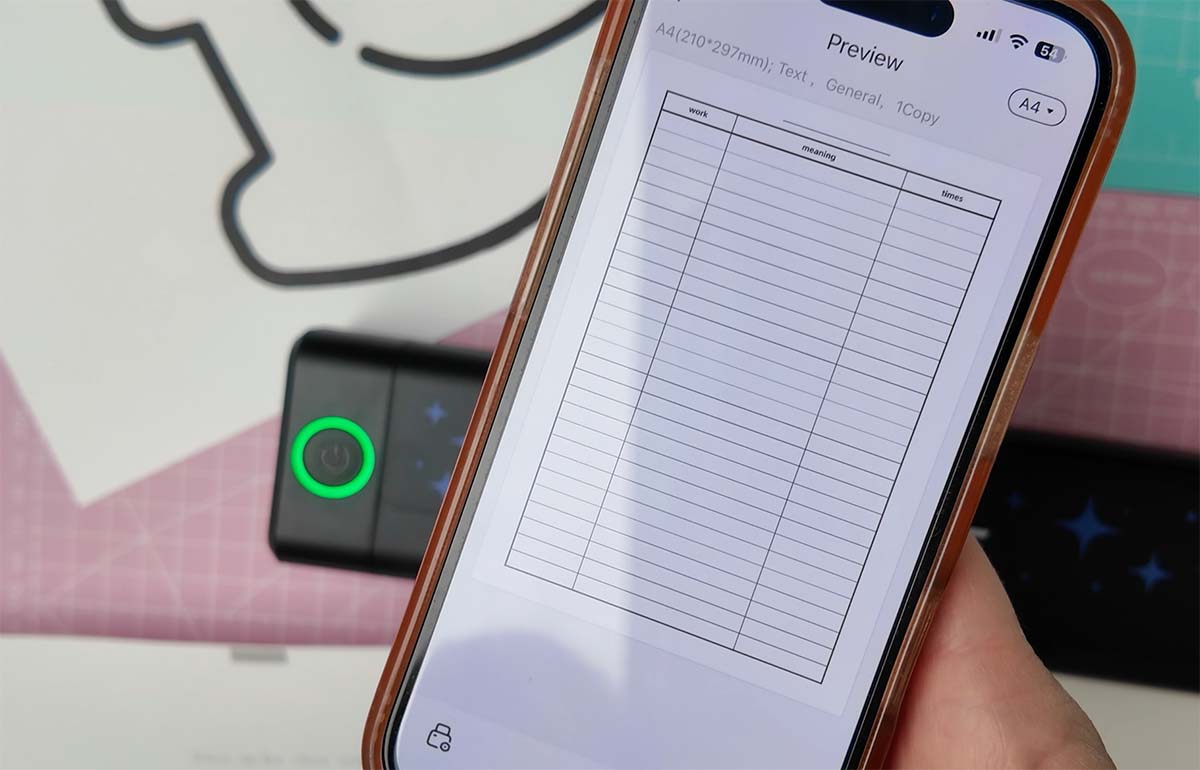
My favourite feature, though, is being able to upload your own documents. I popped in my road trip planner, and the app automatically simplified it and stripped out anything too fussy, so it printed neat, clear and easy to read on thermal paper. That is such a clever touch, and it is exactly why I will keep reaching for this printer.
All of this makes the NEWYES thermal printer brilliant for printing on the go, especially when you are out and about or stuck in the car with the kids and need an activity in a hurry.
How Much Does the NEWYES Thermal Printer Cost to Run?
The NEWYES printer costs around £95, which is a one-off price. After that, there is no ink to buy. You only need thermal paper.
Thermal paper is not expensive. The sheets I found ranged from £3.27 to £6.99, depending on the seller. So for ink-heavy projects, such as travel planners and worksheets, you can save a fair bit.
NEWYES Thermal Printer Pros and Cons
What I love:
- No ink, ever
- Having the versatility of the app and Mac connectivity
- Small, light and portable, with a carry bag included
- Connects to your phone by app, and to a PC or Mac
- Prints A4 and US Letter
- Rechargeable through USB-C
- Perfect for travel documents, worksheets, maps and colouring pages
Things to know:
- It prints in black and white only
- It needs thermal paper, so there is still a paper cost
- Colouring pencils scratch the surface, so use felt pens
- Thermal prints can fade in heat and bright light, so they’re not for keepsake documents, but perfect for worksheets and travel documents

Who Is the NEWYES Thermal Printer Perfect For?
- Travellers who want paper backups of tickets and bookings
- Parents, grandparents and teachers who love printable learning resources
- Homeschoolers and worldschoolers who are often on the move
- Crafters and sellers who want quick labels, colouring pages and printables
- Anyone short on space who still wants a proper A4 printer
How Long Does the Battery Last?
NEWYES says a full charge can print up to about 200 A4 pages, and charging takes around 1.8 hours through USB-C.
Watch My Review And Tracing Word Tutorial Here

My Verdict on the NEWYES Thermal Printer
After using it for travel documents and learning resources, I am a fan. It is small, portable and simple to use, and I never have to think about ink. It has also made printing activities for the kiddies so much easier. Have a look at my colouring pages and North Pole label ideas too.
This is part of a paid collaboration, but all opinions are my own.
